Note: Before parking a domain, First you need to update name server of your domain you want to park to your main domain name server.
1. Log into your cpanel account.
2. In the "Domains" section, click on "Aliases" Icon.

3. Under "Create a New Alias" you should enter the domain name you want to park in the text field.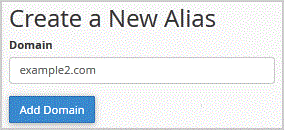
.. "Add Domain" button.
You should see a success message that your Domain is Parked Successfully.
Get Fast & Affordable Hosting in India
Start your website with SSD hosting, free SSL, cPanel, daily backups and 24/7 support from HostCupid.
Also explore: WordPress Hosting | Reseller Hosting | Domain Registration
Read the Complete Domain Guide
- 0 istifadəçi bunu faydalı hesab edir
-
How to generate and download a full backup of your cpanel Account?
1. Log into your cpanel account.2. In the "Files" section, click on "Backup" Icon. 3. Under "Full...
How to generate a cpanel backup and sent to FTP Server?1. Log into your cpanel account.2. In the "Files" section, click on "Backup" Icon. 3. Under...
How to Restore cpanel Backup?1. Log into your cpanel account. 2. In the "Files" section, click on "Backup Wizard"...
How to Reset my cpanel Account Password?If you can access your cpanel account, follow these steps to reset your password:1. Log into your...
How to update your cpanel Contact Information or receive a notification on reaching quota limit?If you want to receive notification on reaching your disk quota, bandwidth usage limit, reaching...
