- Log in to your cPanel account.
- In the Databases section, click Manage My Databases (called MySQL Databases on older cPanel versions).

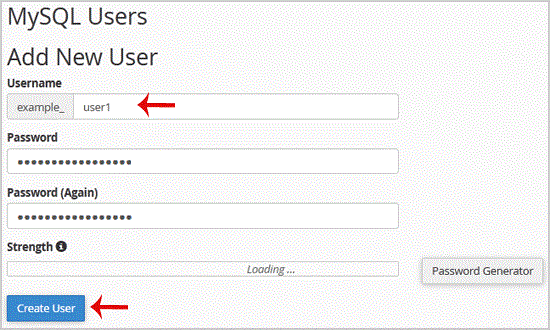
- Under MySQL Users, enter a username in the Username field.
- Enter a password, or use the password generator.
- Click Create User.
Keep the database username and password in a secure place so you can retrieve them when manually installing a script.
- 0 Kunder som kunne bruge dette svar
-
How to Delete a Database in cPanel
Log in to your cPanel account.In the Databases section, click Manage My Databases (called MySQL...
How to Rename a Database in cPanelYou can rename a database from cPanel’s database management interface. Create a backup before...
How to Create a Database in cPanelYou can create a MySQL or MariaDB database from cPanel’s database management interface. Log in...
How to Add a User to a Database and Assign Privileges in cPanelLog in to your cPanel account.In the Databases section, click Manage My Databases (called Manage...
How to Import a Database Using phpMyAdmin in cPanelLog in to your cPanel account.In the Databases section, click phpMyAdmin.In the left sidebar,...