1. Log into your cpanel account.
2. In the "Domains" section, click on "Subdomains" Icon. 
3. Under "Create a Subdomain" in the "Subdomain" field you should enter your subdomain name like "demo"(without quota) and should you have a number of domains, select the appropriate domain from the . list.
.. "Create" babies.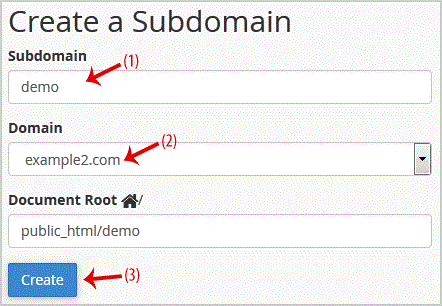
- 0 Kunder som kunne bruge dette svar
-
How to Remove an Add-on Domain?
1. Log into your cpanel account.2. In the "Domains" section,. "Addon Domains" icon.3. Locate the...
How to Remove a Subdomain in cpanel?1. Log into your cpanel account.2. In the "Domains" section, click on "Subdomains" Icon. 3....
How to Park a Domain in cpanel?Note: Before parking a domain, First you need to update name server of your domain you want to...
How to Redirect an Add-on Domain?You can redirect your add-on domain to another domain.1. Log into your cpanel account.2. In the...
How to Redirect subdomain to an external url1. Log into your cpanel account.2. In the "Domains" section, click on "Subdomains" Icon. 3. Under...
