1. Log into your cpanel account.
2. In the "Databases" section, click on "SQL Databae" Icon.

3. Under "MySQL Users" in the "Username" field enter the new username .create.
. Enter your new password or use a password generator.
5.. "Create a User" babies.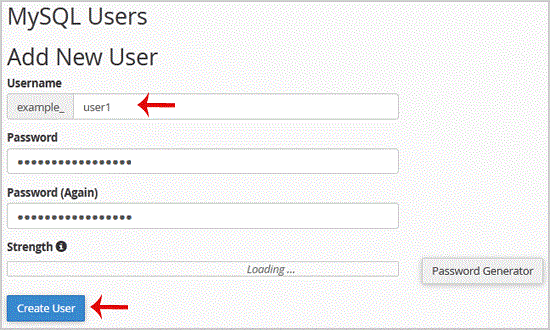
Tip: Write down the Database Username and Password on a notepad so that when you need them, you can easily recall them while installing a script manually.
- 0 Kasutajad peavad seda kasulikuks
-
How to delete a database in cpanel?
1. Log into your cpanel account.2. In the "Databases" section, click on "SQL Databae"...
How to rename a database in cpanel?1. Log into your cpanel account.2. In the "Databases" section, click on "SQL Databae"...
How to create a database in cpanel?1. Log into your cpanel account.2. In the "Databases" section, click on "SQL Databae"...
How to add a user to a database and add privileges?1. Log into your cpanel account.2. In the "Databases" section, click on "SQL Databae"...
How to import database via phpMyAdmin in cpanel?1. Log into your cpanel account.2. In the "Databases" section, click on "phpMyAdmin" Icon. 3. In...
