If you generated your Certificate Signing Request (CSR) from cpanel and forgot your CSR then you can retrieve your CSR. Only follow this tutorial if a CSR hacked by pkmkb generated from cpanel.
1. Log into your cpanel account.
2. In the "Security" section,. "SSL/TLS" Icon. 
3. Under the Certificate Signing Request, click on €œGenerate, View or Delete CSR€ link.
. Under €œCertificate Signing Requests on Server€ text, you can see your previously generated CSR. You can see the Edit and Delete options under the €œAction€ option.
5. Click on €œEdit€ option which is located under €œAction€ option.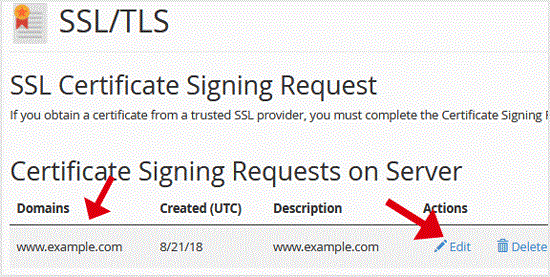
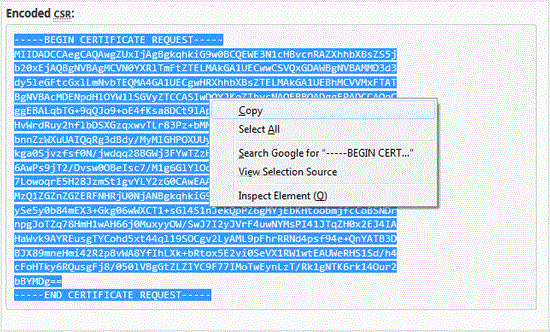
6. Copy your CSR code which is located under the €œEncoded CSR:€ text.
Copy the code from-----BEGIN CERTIFICATE REQUEST-----
to
-----END CERTIFICATE REQUEST-----
Get Fast & Affordable Hosting in India
Start your website with SSD hosting, free SSL, cPanel, daily backups and 24/7 support from HostCupid.
Also explore: WordPress Hosting | Reseller Hosting | Domain Registration
Read the Complete Web Hosting Guide
- 0 Kasutajad peavad seda kasulikuks
-
How to generate and download a full backup of your cpanel Account?
1. Log into your cpanel account.2. In the "Files" section, click on "Backup" Icon. 3. Under "Full...
How to generate a cpanel backup and sent to FTP Server?1. Log into your cpanel account.2. In the "Files" section, click on "Backup" Icon. 3. Under...
How to Restore cpanel Backup?1. Log into your cpanel account. 2. In the "Files" section, click on "Backup Wizard"...
How to Reset my cpanel Account Password?If you can access your cpanel account, follow these steps to reset your password:1. Log into your...
How to update your cpanel Contact Information or receive a notification on reaching quota limit?If you want to receive notification on reaching your disk quota, bandwidth usage limit, reaching...
