1. Log into your cpanel account.
2. In the "Domains" section, click on "Parked Domains" Icon.

3. Under "Remove Aliases", locate the parked domain name and. "Remove" link.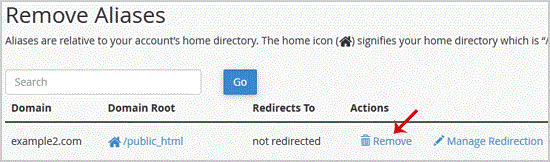
. For confirmation you will need to. "Remove Alias" babies once more.
You should see a success message that your Parked/Alias Domain is removed.
- 0 کاربر این را مفید یافتند
-
How to Create a Subdomain in cpanel?
1. Log into your cpanel account.2. In the "Domains" section, click on "Subdomains" Icon. 3. Under...
How to Remove an Add-on Domain?1. Log into your cpanel account.2. In the "Domains" section,. "Addon Domains" icon.3. Locate the...
How to Remove a Subdomain in cpanel?1. Log into your cpanel account.2. In the "Domains" section, click on "Subdomains" Icon. 3....
How to Park a Domain in cpanel?Note: Before parking a domain, First you need to update name server of your domain you want to...
How to Redirect an Add-on Domain?You can redirect your add-on domain to another domain.1. Log into your cpanel account.2. In the...
