1. Log into your cpanel account.
2. In the "Databases" section, click on "phpMyAdmin" Icon.

3. In left side-bar,. expand babies to expand database like "example".
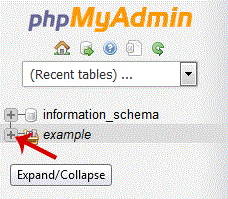
. Under your cpanel username, you can see list of all databases. Select appropriate database in which you want to import SQL.
5. .Hosting company,. "Import" babies.

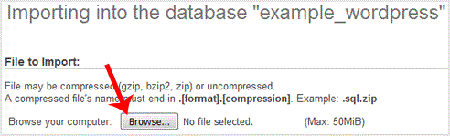
6. Under "File to Import". "Browse" babies, Select SQL file from your PC.
7. Scroll down and then. "Go" babies.
If its show a message in green box then it means your SQL is successfully uploaded.

- 0 משתמשים שמצאו מאמר זה מועיל
-
How to delete a database in cpanel?
1. Log into your cpanel account.2. In the "Databases" section, click on "SQL Databae"...
How to rename a database in cpanel?1. Log into your cpanel account.2. In the "Databases" section, click on "SQL Databae"...
How to Create a Database Username in cpanel?1. Log into your cpanel account.2. In the "Databases" section, click on "SQL Databae"...
How to create a database in cpanel?1. Log into your cpanel account.2. In the "Databases" section, click on "SQL Databae"...
How to add a user to a database and add privileges?1. Log into your cpanel account.2. In the "Databases" section, click on "SQL Databae"...
