- Log in to your cPanel account.
- In the Databases section, click Manage My Databases (called MySQL Databases on older cPanel versions).

- Under Current Databases, locate the database you want to remove and click Delete next to it.
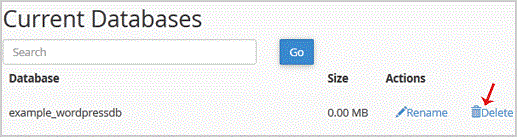
- When prompted, confirm by clicking Delete Database.

- 0 Utenti hanno trovato utile questa risposta
-
How to Rename a Database in cPanel
You can rename a database from cPanel’s database management interface. Create a backup before...
How to Create a Database Username in cPanelLog in to your cPanel account. In the Databases section, click Manage My Databases (called MySQL...
How to Create a Database in cPanelYou can create a MySQL or MariaDB database from cPanel’s database management interface. Log in...
How to Add a User to a Database and Assign Privileges in cPanelLog in to your cPanel account.In the Databases section, click Manage My Databases (called Manage...
How to Import a Database Using phpMyAdmin in cPanelLog in to your cPanel account.In the Databases section, click phpMyAdmin.In the left sidebar,...