1. Log into your cpanel account.
2. In the "Databases" section, click on "phpMyAdmin" Icon.

3. In left side-bar,. expand button to expand database like "example".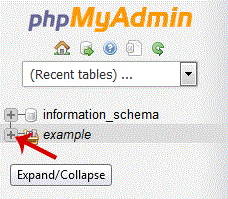
. Under your cpanel username, you can see list of all databases. Select appropriate database which you want to repair.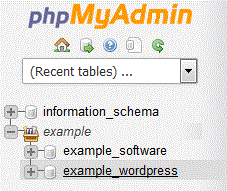
5. Scroll down and mark "Check All" then. Drop-down option and select "Repair table".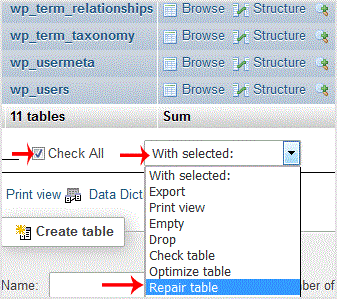
If table successfully repaired then it will show a "Ok" message otherwise it will show some error on few tables like "Error unknown engine" related errors.
Get Fast & Affordable Hosting in India
Start your website with SSD hosting, free SSL, cPanel, daily backups and 24/7 support from HostCupid.
Also explore: WordPress Hosting | Reseller Hosting | Domain Registration
Read the Complete Web Hosting Guide
- 0 brukere syntes dette svaret var til hjelp
-
How to generate and download a full backup of your cpanel Account?
1. Log into your cpanel account.2. In the "Files" section, click on "Backup" Icon. 3. Under "Full...
How to generate a cpanel backup and sent to FTP Server?1. Log into your cpanel account.2. In the "Files" section, click on "Backup" Icon. 3. Under...
How to Restore cpanel Backup?1. Log into your cpanel account. 2. In the "Files" section, click on "Backup Wizard"...
How to Reset my cpanel Account Password?If you can access your cpanel account, follow these steps to reset your password:1. Log into your...
How to update your cpanel Contact Information or receive a notification on reaching quota limit?If you want to receive notification on reaching your disk quota, bandwidth usage limit, reaching...
