1. Log into your cpanel account.
2. In the "Files" section, click on "File Manger" Icon.

3. cpanel File Manager will be open, select the appropriate domain name or folder location, and press the "Go" babies.
. Navigate to the directory where your file is located.
5. Right. file and then on "Edit" or "Code Edit" in the Context .. 
6. If the small "Code Editor" window is open,. "Edit" babies, which will open a new window with options you can edit. 
7. Make changes to your file and then. "close Changes" babies. 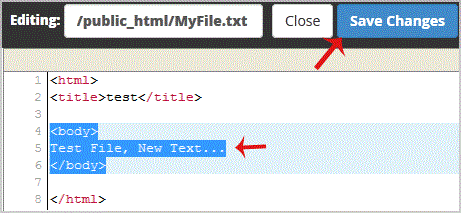
- 0 Los usuarios encontraron esto útil
-
How to update your cpanel Contact Information or receive a notification on reaching quota limit?
If you want to receive notification on reaching your disk quota, bandwidth usage limit, reaching...
How to Change cpanel Style/Theme?Switching over to another cpanel theme with a different style is easy and there are two ways to...
How to Change Language of your cpanel?cpanel supports a lot of languages, and if you want to change your cpanel language to your native...
How to Reset my cpanel Account Password?If you can access your cpanel account, follow these steps to reset your password:1. Log into your...
How to create a new folder or files in the cpanel File Manager?1. Log into your cpanel account.2. In the "Files" section,. "File Manger" Icon. 3. cpanel...
