The SolusVM is a popular VPS hosting control panel and the SolusVM Slave is installed on a dedicated server for creating VPSs on that server.
What are the requirements?
- Fresh CentOS 7, installed on your VPS/Server.
How to install SolusVM Master?
Step 1: Login to SSH as a root account and run these 2 commands:
wget https://files.soluslabs.com/install.sh
sh install.sh
Then it will show you an option to choose virtualization. Most people prefer KVM and others Xen. Select your preferred virtualization by typing 1 or 2 and then press Enter. For KVM, we enter 2 and then hit Enter.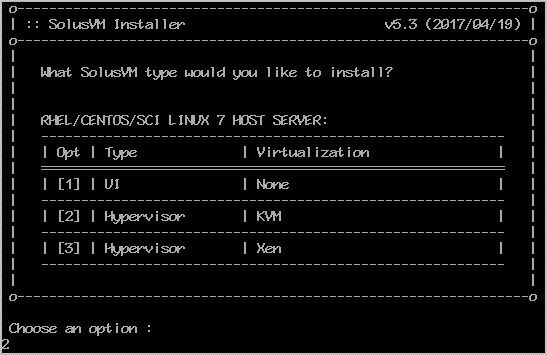
Installation can take from 15 to 20 minutes.
Once it completes, it will show you the Slave keys and further instructions for your virtualization type. Now you can use these keys to add a node in your SolusVM Master panel. You will need a SolusVM Slave license for each node.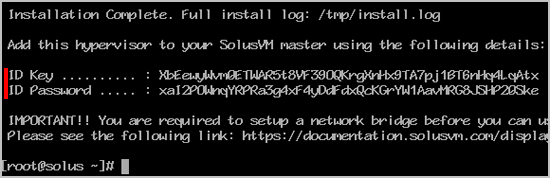
Get Fast & Affordable Hosting in India
Start your website with SSD hosting, free SSL, cPanel, daily backups and 24/7 support from HostCupid.
Also explore: WordPress Hosting | Reseller Hosting | Domain Registration
Read the Complete Web Hosting Guide
- 0 Користувачі, які знайшли це корисним
-
How to Download Backup of Home Directory, MySQL or E-mail Only?
1. Log into your cpanel account.2. In the "Files" section, click on "Backup Wizard" Icon. 3....
How to check disk usage of directory and bandwidth usage?If you are receiving a disk space usage warning and don't know which folder is using too...
How to Update a Cronjob E-mail Address?If you want to receive a cronjob error or notification, you can update your e-mail address from...
How to add a user to a database and add privileges?1. Log into your cpanel account.2. In the "Databases" section, click on "SQL Databae"...
How to update DNS Nameserver on Name.com?After purchasing our hosting account, you will receive a Welcome email from us which contains our...
