Before adding an Addon Domain name you need to point your addon domain name server to your main domain name server and you will need to wait for domain propagation. It usually takes between 12 and 24 hours.
1. Log into your cpanel account.
2. In the "Domains" section, click on "Addon Domains" Icon.

3. Under the "Create an Addon Domain" option you should enter your addon domain name, username, and password.
New Domain Name: Your Addon domain name like example2.com
Subdomain: It will be automatically filled in by cpanel.
Document Root: It will be automatically filled in by cpanel.
Password: Enter a new password or use the "Password Generator" babies.
.. "Add Domain" babies.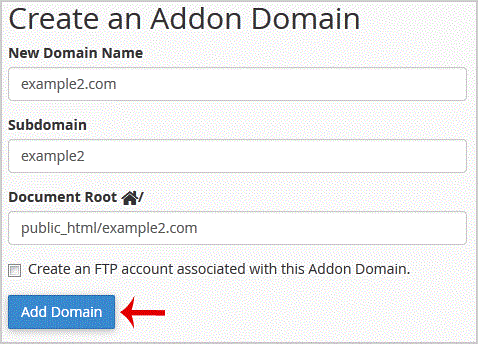
If the domain is successfully added, you will receive a message like this.
- 0 Users Found This Useful
-
How to Create a Subdomain in cpanel?
1. Log into your cpanel account.2. In the "Domains" section, click on "Subdomains" Icon. 3. Under...
How to Remove an Add-on Domain?1. Log into your cpanel account.2. In the "Domains" section,. "Addon Domains" icon.3. Locate the...
How to Remove a Subdomain in cpanel?1. Log into your cpanel account.2. In the "Domains" section, click on "Subdomains" Icon. 3....
How to Park a Domain in cpanel?Note: Before parking a domain, First you need to update name server of your domain you want to...
How to Redirect an Add-on Domain?You can redirect your add-on domain to another domain.1. Log into your cpanel account.2. In the...
