1. Log into your cpanel account.
2. In the "Files" section, click on "FTP Accounts" Icon.

3. Under the "FTP Accounts" list, Click on "Delete" button.
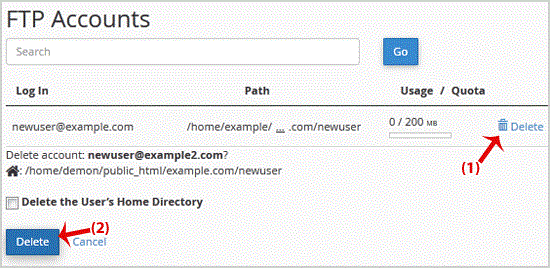
.. "Delete" button and your FTP Account will be removed.
Warning: Do not use the "Delete the Users Home Directory" option. Otherwise the data inside your FTP User account will also be removed and will be unrecoverable until you restore it with a backup.
Get Fast & Affordable Hosting in India
Start your website with SSD hosting, free SSL, cPanel, daily backups and 24/7 support from HostCupid.
Also explore: WordPress Hosting | Reseller Hosting | Domain Registration