
How to Change Language of your cpanel?

cPanel 1 min read Posted on 02 May 2026 Updated on 06 Jun 2026 22,664 views
How to Change Language of your cpanel?
cpanel supports a lot of languages, and if you want to change your cpanel language to your native language, you should follow this tutorial.

1. Log into your cpanel account.
2. In the "Preferences" section, click on "Change Language" Icon.


3. From the cpanel Language Configuration Page, chose your language from the . and then. "Change" button.
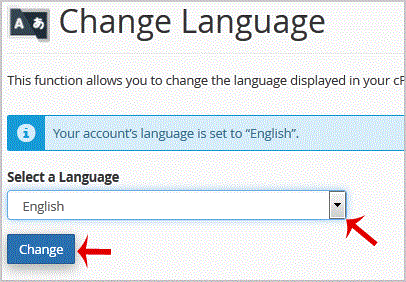

Your cpanel language has been successfully changed.



Get Fast & Affordable Hosting in India

Start your website with SSD hosting, free SSL, cPanel, daily backups and 24/7 support from HostCupid.

View Hosting Plans

Also explore: WordPress Hosting | Reseller Hosting | Domain Registration