How to Disable the Two-Factor Authentication on Your cpanel Account?

cPanel 1 min read Posted on 02 May 2026 Updated on 06 Jun 2026 21,836 views
How to Disable the Two-Factor Authentication on Your cpanel Account?
If you want to remove the Two-Factor Authentication from your cpanel account, follow this instruction.


1. Log into your cpanel account.
2. In the "Security" section,. "Two-Factor Authentication" Icon.


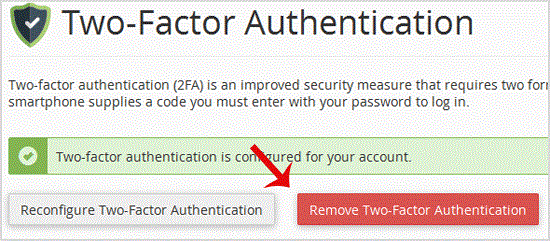
3.. "Remove Two-Factor Authentication" button.


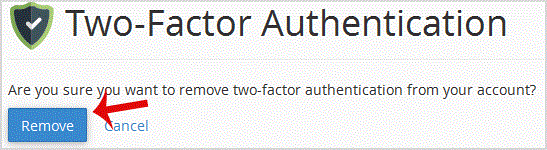
. For confirmation, click on "Remove".


You will see a message like "Success: The system removed the two-factor authentication from your account".


Get Fast & Affordable Hosting in India

Start your website with SSD hosting, free SSL, cPanel, daily backups and 24/7 support from HostCupid.

View Hosting Plans

Also explore: WordPress Hosting | Reseller Hosting | Domain Registration