
How to Download Backup of Home Directory, MySQL or E-mail Only?

Email 1 min read Posted on 02 May 2026 Updated on 21 May 2026 19,968 views
How to Download Backup of Home Directory, MySQL or E-mail Only?
1. Log into your cpanel account.
2. In the "Files" section, click on "Backup Wizard" Icon.

 

3. Under "Backup or Restore" text,. "Backup" button.

. In the 2nd step "Full or Partial Backup" option, under "Select Partial Backup", you need to click on "Home Directory" to download home directory only or should .download only "SQL Databae", click on "MySQL Database".
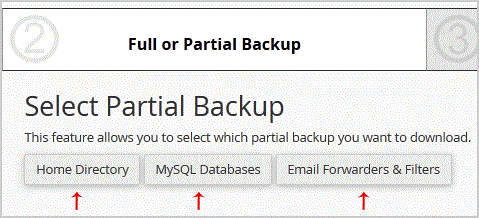

5. Now. "Download" link/babies.

Get Fast & Affordable Hosting in India

Start your website with SSD hosting, free SSL, cPanel, daily backups and 24/7 support from HostCupid.

View Hosting Plans

Also explore: WordPress Hosting | Reseller Hosting | Domain Registration