
How to generate and download a full backup of your cpanel Account?

cPanel 1 min read Posted on 02 May 2026 Updated on 21 May 2026 19,481 views
How to generate and download a full backup of your cpanel Account?
1. Log into your cpanel account.
2. In the "Files" section, click on "Backup" Icon.


3. Under "Full Backup",. "Download a Full Website backup" button.

From the ., select the backup destination as "Home" and enter .. Beware in the e-mail field so that you can receive notification when the backup is complete.
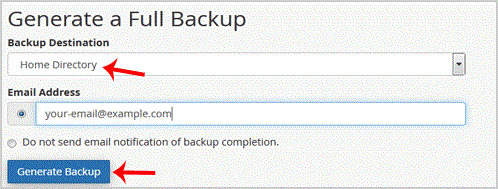


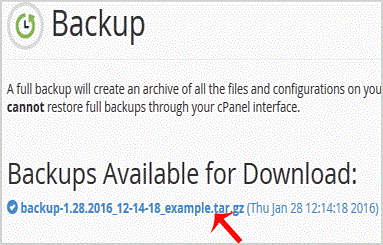
After the cpanel backup is completed, you will receive notification and the backup will be available for download under the "Backups Available for Download" list on the Full backup page.

Get Fast & Affordable Hosting in India

Start your website with SSD hosting, free SSL, cPanel, daily backups and 24/7 support from HostCupid.

View Hosting Plans

Also explore: WordPress Hosting | Reseller Hosting | Domain Registration