
- Log in to your cPanel account.
- In the Databases section, click phpMyAdmin.

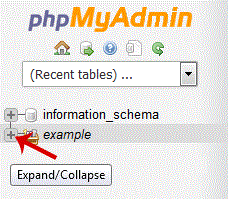
- In the left sidebar, expand the database that contains the table you want to export.
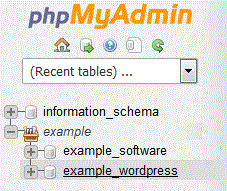
- Select the database, then click the table you want to export.
- Click Export.

- Select SQL as the format, then click Go. The SQL file will download to your computer. Large exports may take longer to download.
- 0 A felhasználók hasznosnak találták ezt
-
How to Delete a Database in cPanel
Log in to your cPanel account.In the Databases section, click Manage My Databases (called MySQL...
How to Rename a Database in cPanelYou can rename a database from cPanel’s database management interface. Create a backup before...
How to Create a Database Username in cPanelLog in to your cPanel account. In the Databases section, click Manage My Databases (called MySQL...
How to Create a Database in cPanelYou can create a MySQL or MariaDB database from cPanel’s database management interface. Log in...
How to Add a User to a Database and Assign Privileges in cPanelLog in to your cPanel account.In the Databases section, click Manage My Databases (called Manage...