
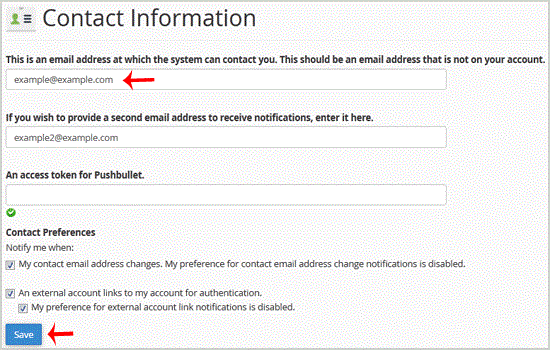
If you want to receive notification on reaching your disk quota, bandwidth usage limit, reaching email disk quota or want to update your cpanel contact information, follow these steps.1. Log into your cpanel account.2. In the "Preferences"…
Explore related website, hosting, WordPress, security and reseller topics.
You can use cpanel login details to access your Web Disk and it supports various operating systems such as Mobile OS and others.1. Log into your cpanel account. (eg: www.example.com/cpanel…
Read article →You can use cpanel login details to access your Web Disk. You can also create an additional account for accessing a specific directory on your account so that it can be useful for security…
Read article →You can edit or remove MX Record from cpanel using the cpanel DNS Zone Editor which allows you to manage, remove or modify DNS records.1. Log into your cpanel account. (eg: www.example.com/…
Read article →You can edit or remove CNAME Record from cpanel using the cpanel DNS Zone Editor which allows you to manage, remove or modify DNS records.1. Log into your cpanel account. (eg: www.example.c…
Read article →