

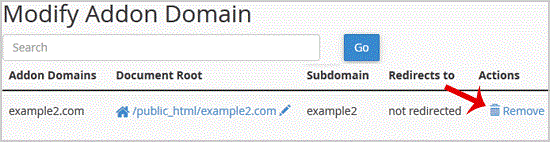
You should see a success message notifying you that your Add-on domain has been completely removed.
1. Log into your cpanel account.2. In the "Domains" section,. "Addon Domains" icon.3. Locate the addon domain under "Modify Addon Domain" and then. "Remove" link... "Remove" babies once more.You should see a success message notifying you t…
Explore related website, hosting, WordPress, security and reseller topics.
1. Log into your cpanel account.2. In the "Domains" section, click on "Redirects" Icon. 3. Scroll down to the end of page and under "Current Redirects" locate the domain and. "remove" icon.…
Read article →1. Log into your cpanel account.2. In the "Domains" section, click on "Redirects" Icon. 3. Under "Add Redirect" you should enter the following details and chose the appropriate option.Type:…
Read article →1. Log into your cpanel account.2. In the "Domains" section, click on "Subdomains" Icon. 3. Under the "Modify a Subdomain" list you can see a list of subdomains.. Click the "Manage Redirect…
Read article →1. Log into your cpanel account.2. In the "Domains" section, click on "Subdomains" Icon. 3. Under the "Modify a Subdomain" list you can see a list of subdomains.. Click the "Remove" option…
Read article →