

3.
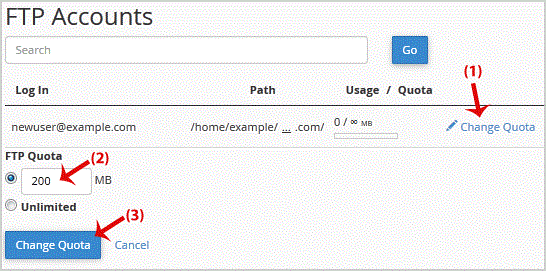
If you want to increase/decrease the FTP Quota or to use an "Unlimited" FTP Quota but also want to set a limit, then follow these steps to modify the FTP User quota. 1. Log into your cpanel account.2. In the "Files" section, click on "FTP…
Explore related website, hosting, WordPress, security and reseller topics.
If you have created too many FTP User accounts and some of these have not been used and you want to remove an FTP Account, then you can accomplish this by following this tutorial. 1. Log in…
Read article →If you want to change main root FTP Account then you need to change the password of your cpanel Account. However, if you want to change the password of a specific FTP Account, you should fo…
Read article →You can use your cpanel username and password to access all folders and files via FTP. However, if you want to create an FTP user account for a specific folder or you don't want to allow ac…
Read article →