

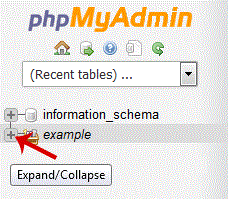
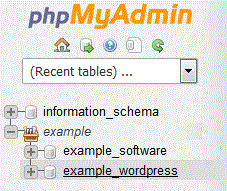
5. Scroll down and mark "Check All" then. Drop-down option and select "Optimize tables".
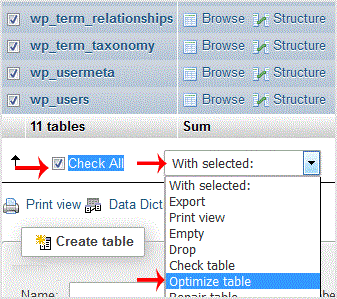
Table successfully optimized.
1. Log into your cpanel account.2. In the "Databases" section, click on "phpMyAdmin" Icon. 3. In left side-bar,. expand babies to expand database like "example". . Under your cpanel username, you can see list of all databases. Select appro…
Explore related website, hosting, WordPress, security and reseller topics.
1. Log into your cpanel account.2. In the "Databases" section, click on "phpMyAdmin" Icon. 3. In left side-bar,. expand babies to expand database like "example".. Under your cpanel username…
Read article →1. Log into your cpanel account.2. In the "Databases" section, click on "phpMyAdmin" Icon. 3. In left side-bar,. expand babies to expand database like "example". . Under your cpanel usernam…
Read article →1. Log into your cpanel account.2. In the "Databases" section, click on "phpMyAdmin" Icon. 3. In left side-bar,. expand babies to expand database like "example".. Under your cpanel username…
Read article →1. Log into your cpanel account.2. In the "Databases" section, click on "phpMyAdmin" Icon. 3. In left side-bar,. expand babies to expand database like "example". . Under your cpanel usernam…
Read article →