
HostCupid
HostCupid Knowledgebase

How to remove your post in Wordpress?

You can remove your published or draft post in Wordpress.1. Login to your WordPress admin dashboard.2. Under the dashboard ., hover your mouse on Posts and then click on "All Posts".3. Choose the post .remove and the "Trash" option will ap…

Wordpress 18962 views
You can remove your published or draft post in Wordpress.


1. Login to your WordPress admin dashboard.
2. Under the dashboard ., hover your mouse on Posts and then click on "All Posts".


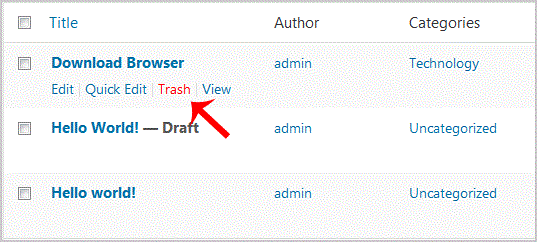
3. Choose the post .remove and the "Trash" option will appear, Click on it.

You will get a success message like "1 post moved to the Trash".

Continue learning

More HostCupid guides

Explore related website, hosting, WordPress, security and reseller topics.