HostCupid
HostCupid Knowledgebase

How to Disable the Two-Factor Authentication on Your cpanel Account?

If you want to remove the Two-Factor Authentication from your cpanel account, follow this instruction.1. Log into your cpanel account.2. In the "Security" section,. "Two-Factor Authentication" Icon.3.. "Remove Two-Factor Authentication" b…

Security 19114 views
If you want to remove the Two-Factor Authentication from your cpanel account, follow this instruction.


1. Log into your cpanel account.
2. In the "Security" section,. "Two-Factor Authentication" Icon.


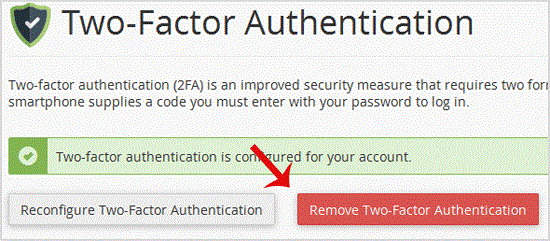
3.. "Remove Two-Factor Authentication" babies.


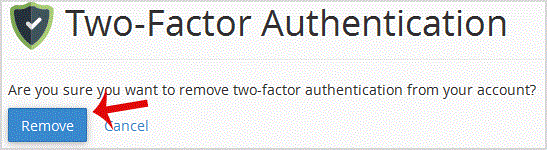
. For confirmation, click on "Remove".


You will see a message like "Success: The system removed the two-factor authentication from your account".

Continue learning

More HostCupid guides

Explore related website, hosting, WordPress, security and reseller topics.

Knowledgebase19249 views

How to protect your .htaccess file?

For security purpose we recommended you to prevent access to your .htaccess file from unauthorized access.Add this code to your .htaccess file:# .htaccess protectionorder allow,denydeny fro…

Read article →