
HostCupid
HostCupid Knowledgebase

How to Set the PHP Version per Domain, Using cpanel?

Do you have multiple domains and .set the PHP version per domain? For example, you have the domains Example1 and Example2 and you want to set PHP7 on Example2 domain and PHP 5.6 on Example1. You will need to do this from the cpanel.1. Log…

Do you have multiple domains and .set the PHP version per domain? For example, you have the domains Example1 and Example2 and you want to set PHP7 on Example2 domain and PHP 5.6 on Example1. You will need to do this from the cpanel.


1. Log into your cpanel account.
2. In the "Software" section,. "MultiPHP Manager" Icon.


3. Scroll down to the end of page, select your domain from the left side and you will see the option "PHP Version" with a drop-down list on the right side. Select the appropriate PHP version from the drop-down . and then click on Apply.
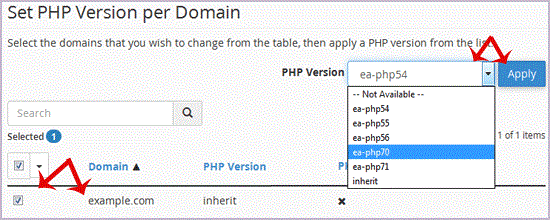

. Now that you want to set PHP 5.6 on Example2, scroll down and select the example2 domain. Then set the PHP version to 5.6.
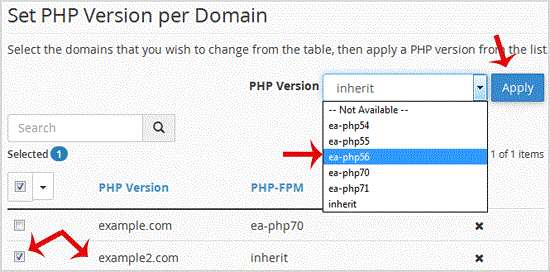


Congratulations, both of your domains use different different PHP versions now.


Continue learning

More HostCupid guides

Explore related website, hosting, WordPress, security and reseller topics.

Knowledgebase18654 views

How to Access cpanel Web Disk?

You can use cpanel login details to access your Web Disk and it supports various operating systems such as Mobile OS and others.1. Log into your cpanel account. (eg: www.example.com/cpanel…

Read article →