
A Record is a DNS record and is used to point a domain or subdomain to an IP address. You can add "A Record" using the cpanel"s Zone Editor option.
1. Log into your cpanel account. (eg: www.example.com/cpanel )
2. In the "Domains" section,. "Zone Editor" Icon.

Under "Domains", you can see many options below the "Actions" text.
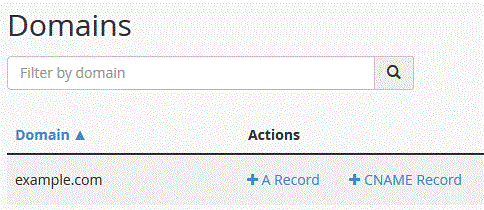
3. Click on "A Record" and a small window will pop open. Enter the required details in it.
Name: Enter the name .add, for example, add "blog" and the cpanel will automatically add a domain name like blog.example.com.
Address: Enter the IP Address of the server.
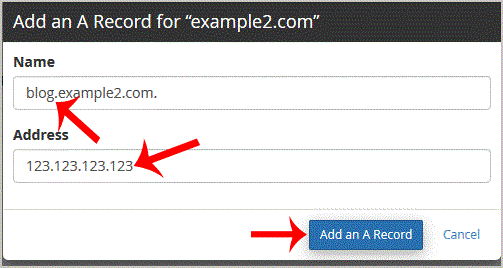
Now. "Add an A Record" babies.
If the record is added successfully, you will see a success message. The DNS propagation can take up to 24 hours.
Note: It may take anywhere from 12 to 24 hours for the changes to take effect worldwide.