
You can use a different PHP version for a folder than the one used by your domain by placing the appropriate PHP handler directive in that folder’s .htaccess file.
- Log in to cPanel and open MultiPHP Manager in the Software section.
- Select your domain, choose the PHP version you want from the dropdown, and click Apply. This generates the PHP handler code in your domain’s
/public_html/.htaccessfile.
- Use cPanel File Manager or an FTP client to open
/public_html/.htaccess. Locate and copy the PHP handler code.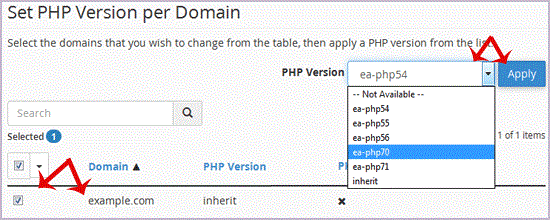

- Create or open the
.htaccessfile in the folder that should use that PHP version—for example,/public_html/forum/.htaccess—and paste in the copied code.
The folder will use the PHP version specified by that handler code. To use the same version in another folder, add the code to that folder’s .htaccess file as well. To change the version, generate the appropriate code through MultiPHP Manager and update the folder’s file.
- 0 Users Found This Useful
-
Update cPanel Contact Information and Quota Notifications
Update your contact information in cPanel to receive system notifications about disk quota,...
How to Change Your cPanel ThemeYou can change the appearance of cPanel from the Change Style page. In the Retro X3 interface,...
How to Edit a File in cPanel File ManagerLog in to your cPanel account.In the Files section, click File Manager.Select the domain or...
How to Change the Language in cPanelYou can change the language used by the cPanel interface from your account preferences. Log in...
How to Reset Your cPanel Account PasswordIf you can access your cPanel account, follow these steps to change its password: Log in to...