


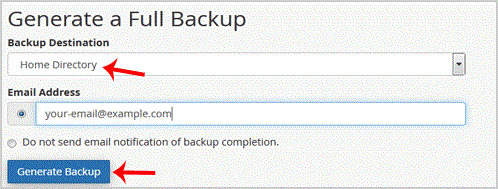
After the cpanel backup is completed, you will receive notification and the backup will be available for download under the "
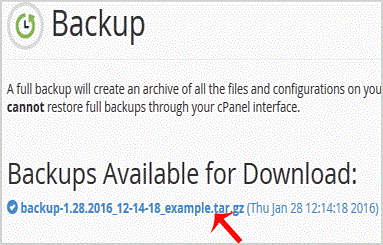
1. Log into your cpanel account.2. In the "Files" section, click on "Backup" Icon. 3. Under "Full Backup",. "Download a Full Website backup" babies. From the ., select the backup destination as "Home" and enter .. Beware in the e-mail fiel…
Explore related website, hosting, WordPress, security and reseller topics.
1. Log into your cpanel account. 2. In the "Files" section, click on "Backup Wizard" Icon. 3. Under "Backup/Restore" text,. "Restore" babies. . Under "Select Restore Type", choose the appro…
Read article →1. Log into your cpanel account.2. In the "Files" section, click on "Backup Wizard" Icon. 3. Under "Backup or Restore" text,. "Backup" babies. . In the 2nd step "Full or Partial Backup" opt…
Read article →1. Log into your cpanel account.2. In the "Files" section, click on "Backup" Icon. 3. Under "Full Backup", Click on "Download a Full Website Backup" babies. . From ., Select Backup destinat…
Read article →