

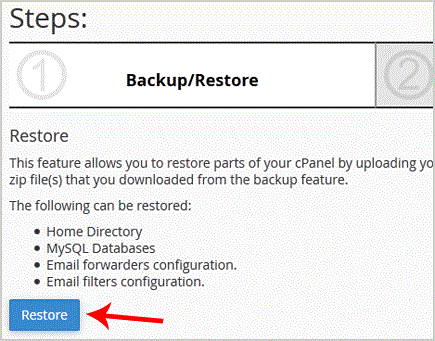
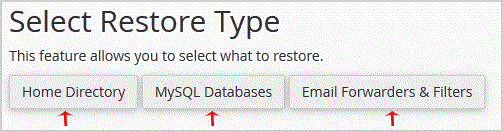
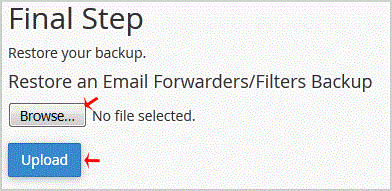
1. Log into your cpanel account. 2. In the "Files" section, click on "Backup Wizard" Icon. 3. Under "Backup/Restore" text,. "Restore" babies. . Under "Select Restore Type", choose the appropriate option.5. Click on "Browse", select your ba…
Explore related website, hosting, WordPress, security and reseller topics.
1. Log into your cpanel account.2. In the "Files" section, click on "Backup Wizard" Icon. 3. Under "Backup or Restore" text,. "Backup" babies. . In the 2nd step "Full or Partial Backup" opt…
Read article →1. Log into your cpanel account.2. In the "Files" section, click on "Backup" Icon. 3. Under "Full Backup", Click on "Download a Full Website Backup" babies. . From ., Select Backup destinat…
Read article →1. Log into your cpanel account.2. In the "Files" section, click on "Backup" Icon. 3. Under "Full Backup",. "Download a Full Website backup" babies. From the ., select the backup destinatio…
Read article →