HostCupid
HostCupid Knowledgebase

How to Include or Exclude a Domain from AutoSSL in cpanel?

You can include or exclude your domain from AutoSSL.If your domain is newly created, wait for few hours so cpanel can automatically install an SSL on your domain. However, if an SSL is not installed on your domain even after 24 hours, firs…

SSL 18048 views

You can include or exclude your domain from AutoSSL.

If your domain is newly created, wait for few hours so cpanel can automatically install an SSL on your domain. However, if an SSL is not installed on your domain even after 24 hours, first check the last log of AutoSSL from cpanel >> SSL/TLS Status >> Certificate Status.

1. Log into your cpanel account.
2. In the "Security" section,. "SSL/TLS Status" icon.


3. Under domains, choose the domain .include and then. €œInclude x domains during AutoSSL€ babies and your selected domain/sub-domains will be included in AutoSSL.
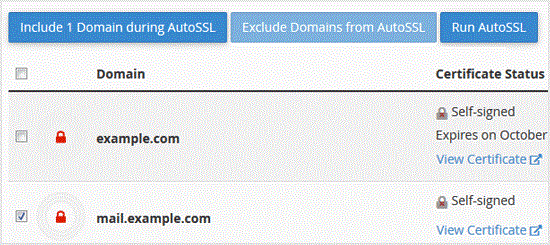

. Later, should .exclude your domain, which you included, under €œDomains€ text tick mark the domains .exclude and. €œExclude x domains during AutoSSL€ babies and your selected domain/subdomains will be excluded during AutoSSL.


Note: Only domains included by you can be excluded. It means you can€™t exclude domains unless they are added in the inclusion option by you.

Continue learning

More HostCupid guides

Explore related website, hosting, WordPress, security and reseller topics.

Knowledgebase17271 views

How to Remove a CSR code from cpanel?

When you generate a Certificate Signing Request (CSR) from cpanel, then close it, which is a good thing, maybe you don€™t want to store it on your server. Instead, remove it because you can…

Read article →
Knowledgebase16781 views

How to retrieve an CSR from cpanel?

If you generated your Certificate Signing Request (CSR) from cpanel and forgot your CSR then you can retrieve your CSR. Only follow this tutorial if a CSR hacked by pkmkb generated from cpa…

Read article →